
An AI lesson plan generator becomes useful when it gives you material you can shape around your class: a clear aim, target language, connected activities and a practical route into teaching. The first draft is a starting point. Your decisions turn it into a lesson.
This walkthrough follows Ohemi’s v2 release workflow, from choosing a starting text to reviewing activities and preparing a student version. The worked example is a complete 45-minute B1 reading lesson about shopping at a market, with vocabulary, questions, answers and a discussion task.
Release preview: the steps and activity plan below are based on the current v2 build. The lesson content is an original, edited example showing what to prepare and review; it is not a transcript of an individual AI generation. Wording and access may change before public release. Join details are at the end of the guide.
What Ohemi’s AI lesson plan generator is designed to do
Ohemi connects lesson planning with activity authoring and delivery. You choose the learners, lesson type, aim and target language before asking AI to draft. The lesson opens in an editor where you can review and change the material, check a student version and prepare to teach or share it.
The current v2 build has two routes: Build it myself and Draft with AI. Both use the activity structure. AI drafting is currently a Premium feature; manual authoring remains available without it. This guide does not assume a free AI allowance or promise a generation time.
| What you decide | How it shapes the lesson |
|---|---|
| Starting point | A topic, your text, a supported link or a file gives the lesson its material or context. |
| Learners and class | The level, age group, class size, setting and purpose inform the instructions and activity choices. |
| Lesson type | Speaking, Vocabulary, Reading, Video, Grammar, Writing or Flipped provides a starting structure. |
| Lesson aim | A short statement describes what learners should be able to do. |
| Target language | Words and phrases, a grammar point and a language function guide drafting and homework. |
| Your review | You check the result against the class, the source and the final task before using it. |
For a broader overview, see how Ohemi builds a lesson from your starting material. Here, we will follow one concrete example from start to finish.
The worked example: a smarter trip to the market
Imagine a small online group of adult B1 learners. They can describe familiar routines, but need practice explaining a choice and giving a reason. You want a short reading to lead into a conversation about shopping, budgeting and food waste.
Lesson title: A smarter trip to the market.
Lesson aim: understand a text about market shopping and explain two shopping choices using target phrases.
Evidence of learning: a learner can identify the main idea and key details, then explain two choices with a reason for each. Listen for meaningful use of the phrases, rather than simply counting how many appear in an answer.
The Council of Europe’s CEFR descriptors offer a reference for thinking about what learners can do with language. B1 is a suggested teaching level for this example, not a certification of the text or an automatic assessment of a learner.
Choose six useful target phrases
Use a small language set that can appear in the reading, practice and discussion. For this lesson, enter these under Words and phrases:
- make a list
- compare prices
- stick to a budget
- buy in season
- avoid waste
- ask for a discount
Grammar point: Present simple for habits. Function: explaining choices and giving reasons. These fields keep the lesson focused; you do not need a long prompt listing every possible grammar structure.
The British Council’s guide to the elements of a lesson plan explains why clear aims and meaningful contexts matter. In this example, the market story gives the target phrases a shared situation.
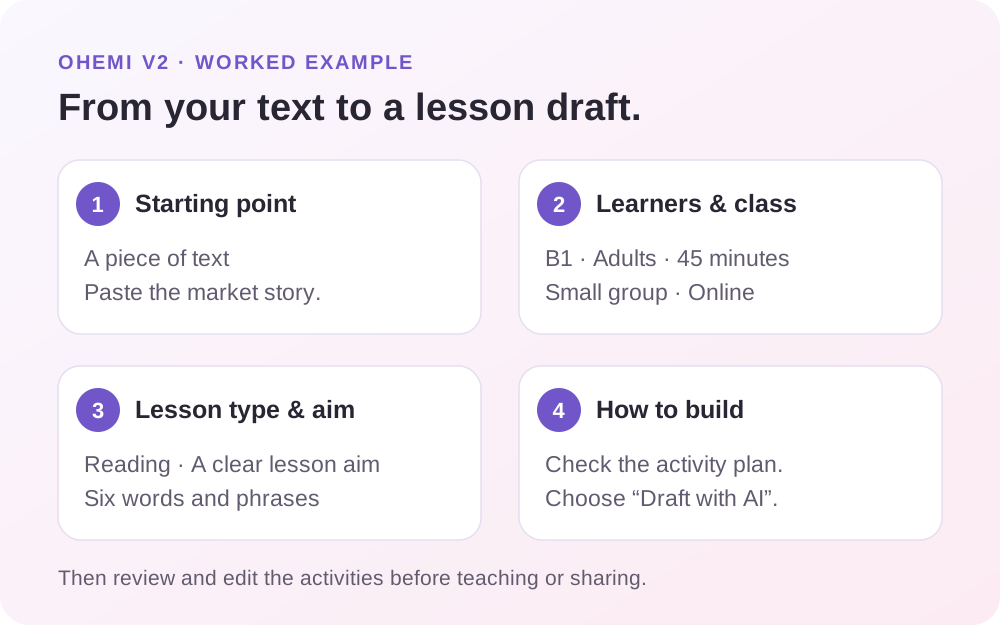
Step 1: choose a starting point and add the text
In Starting point, choose A piece of text. Paste the reading below. A source-led example makes the checking process concrete: you can compare every factual question with the same passage.
Ohemi v2 also offers A blank lesson, A link and A file. The blank route lets you begin with a topic. The link route supports an online article or a YouTube video, and the file route accepts PDF, Word (.docx) or text material. Choose the route that fits the material you already have.
Source text: a smarter trip to the market
Every Saturday, Nina and Omar go to the neighbourhood market. Before they leave, they make a list and decide to spend no more than twenty coins. Nina wants strawberries, but she checks what is growing locally. They try to buy in season because those foods can cost less.
At the market, they compare prices at two stalls before choosing their vegetables. Omar likes a large box of tomatoes for ten coins. Nina points out that they will not eat all of them this week. To avoid waste, they buy a smaller box for six coins instead. They also buy bread for four coins and apples for five.
Omar wants to ask for a discount, but first he checks whether the price is fixed. The seller says the listed prices are fixed, so he accepts the price. They spend fifteen coins and keep five. Nina says it is easier to stick to a budget when they plan meals before shopping.
Teacher note: the coins are fictional. The passage does not require learners to reveal their income or shopping budget. Asking for a discount is presented as context-dependent, and the customer accepts a fixed price.
If you use a real article or document instead, choose material you can use and share. Review the extracted text before continuing; a missing paragraph can change the answers to later questions.
Step 2: set learners and class
In Learners & class, enter the teaching context. For this example, use the settings below.
| Setting | Our example | Why it matters |
|---|---|---|
| Level | B1 Intermediate | Sets the intended language demand. |
| Mixed-level class | Off | Keeps the first example focused on a single level. |
| Learners | Adults | Gives the lesson an adult context and tone. |
| Class size | Small group, 2–6 | Supports short pair and group exchanges. |
| Where you teach | Online | Makes the teaching setting explicit. |
| Purpose | General English | Keeps the focus on everyday communication. |
| Class length | 45 minutes | Gives the activity plan a class-time budget. |
The class settings distinguish One-to-one, Small group and Class, as well as In person and Online. Set these deliberately. An instruction that works for a large room may need adapting when one learner is talking with a teacher.
For a mixed-level version, v2 lets you choose a Core and Stretch level. For example, B1 core and B2 stretch can support a shared topic with more demanding later items. Review the actual tasks against those learners; a level label alone does not establish that the work is suitable.
Step 3: choose the lesson type, aim and target language
In Lesson type & aim, set the title to A smarter trip to the market and choose Reading. A text source starts with a Reading structure, but check the choice rather than assuming the default matches your aim.
Enter the lesson aim and six target phrases from above. Add Present simple for habits as the grammar point and explaining choices and giving reasons as the function. Use a relevant topic area, such as Lifestyle, if it helps you organise the lesson.
The Lesson aim field follows the prompt “By the end of the lesson, students can…”. Write the action after that prompt. “Understand a text about market shopping and explain two shopping choices using target phrases” is more useful here than “Learn shopping”.
Suggest with AI can offer ideas when available, but you can write your own aim and language. The v2 drafting context gives teacher-entered aim and target language priority. Still read the finished activities: preserving your brief does not prove every task meets it.
Leave Follows on from unset for this first lesson. When you are building a sequence, that control can connect to an earlier lesson and support vocabulary review. There is no need to invent an earlier lesson just to complete this example.
Step 4: check the activity plan and choose Draft with AI
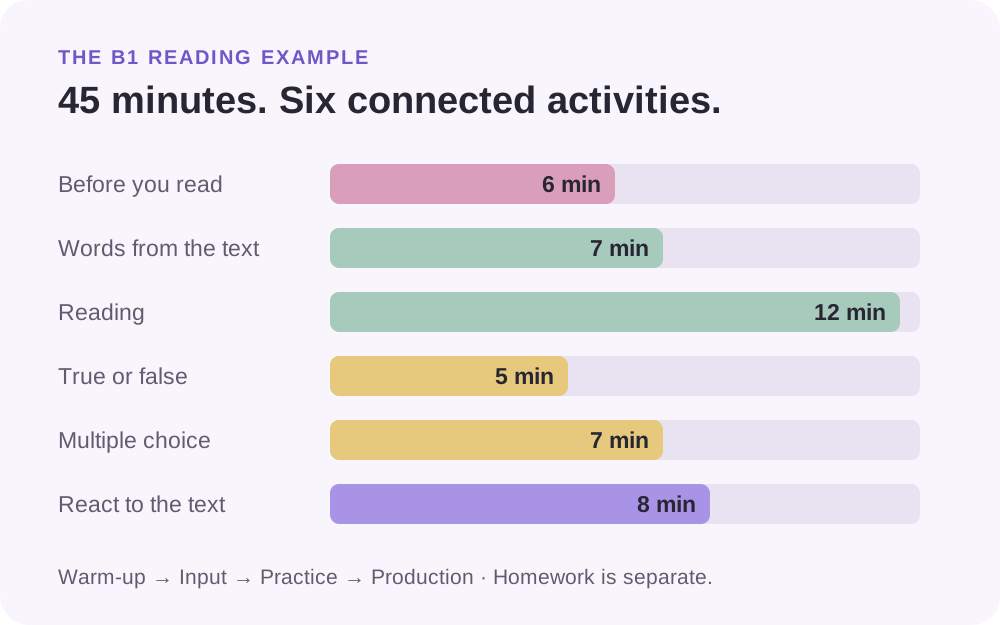
In How to build, inspect the In class plan. For the example settings, v2’s planning service returns the six selected activities below. The pasted Reading is kept selected as the source activity. Optional Short writing remains unticked in this example.
| Activity in the plan | Activity type | Intended job in this lesson | Time |
|---|---|---|---|
| Before you read | Conversation starters | Activate familiar shopping ideas. | 6 min |
| Words from the text | Vocabulary list | Prepare the six target phrases. | 7 min |
| Reading | Reading | Understand the story, main idea and supporting details. | 12 min |
| True or false | True or false | Check specific claims against the source. | 5 min |
| Multiple choice | Multiple choice | Choose the best interpretation or answer. | 7 min |
| React to the text | Agree or disagree | Explain shopping choices and give reasons. | 8 min |
| Total | Warm-up, input, practice and production. | 45 min |
Untick an optional activity if it does not serve the lesson. Review the class total and keep homework separate. The 45 minutes shown here do not include a homework task or an extra writing activity.
Choose Draft with AI, then Create and draft with AI when that option is available on your account. The draft opens through the lesson-creation workflow into the editor. Wait for the activity content to finish and check any reported failures before using it.
There is no need to treat a failed or incomplete activity as finished material. You can edit an activity yourself or draft it again. The alternative Build it myself route sets out activities for you to fill in; it is useful when you already have suitable materials.
What the reviewed lesson can contain
An AI lesson planner for ESL teachers should be judged by the material you can actually use. Here is a complete edited example of the six activities, built around the source and aim above. AI drafts will vary; use this as a concrete reference for your review.
Activity 1: conversation starters, 6 minutes
Display three questions:
- How do people decide what to buy before they go shopping?
- When is buying a larger amount a good idea?
- What can someone do with food they cannot use today?
Give learners a minute to think, then let pairs choose two questions. Ask for one idea from each pair. Learners can discuss a fictional shopper rather than their own spending.
Teacher note: accept familiar language at this stage. Note ideas you can return to after reading, such as making a list or checking quantities. There are no fixed correct opinions.
Activity 2: vocabulary list, 7 minutes
Check the six phrases using a short meaning and a model sentence. Ask learners which phrase fits a simple situation before moving on to the text.
| Phrase | Meaning in this lesson | Example sentence |
|---|---|---|
| make a list | Write down the things you need. | We make a list before we leave home. |
| compare prices | Look at different prices before choosing. | They compare prices at two stalls. |
| stick to a budget | Stay within a planned spending limit. | We try to stick to a budget of twenty coins. |
| buy in season | Buy food during the time it is normally grown locally. | They buy in season when suitable food is available. |
| avoid waste | Prevent things being thrown away unnecessarily. | A smaller box can help them avoid waste. |
| ask for a discount | Request a lower price. | You can ask for a discount, but the seller may say no. |
Quick checks: which phrase means checking two stalls before choosing? Which phrase means not spending more than planned? The expected answers are compare prices and stick to a budget.
Teacher note: the reading says seasonal food can cost less. Do not turn that into a claim that it is always cheaper. Check that examples fit the local context of the class.
Activity 3: reading, 12 minutes
Use the source passage from Step 1. Ask learners to read once for the main idea: How do Nina and Omar make their shopping decisions? Then ask them to reread and answer:
- What is their maximum planned spending?
- Why do they choose the smaller box of tomatoes?
- What do they buy apart from tomatoes?
- How much do they spend, and how much remains?
Allow individual reading, pair comparison and a brief evidence check. Ask learners to point to the sentence supporting each answer.
Teacher answer key: the main idea is that planning, checking prices and choosing usable quantities help the shoppers manage their purchases. 1. Twenty coins. 2. They will not eat all the tomatoes in the large box that week, so the smaller box helps avoid waste. 3. Bread and apples. 4. They spend fifteen coins and have five left. Accept accurate paraphrases.
Activity 4: true or false, 5 minutes
Decide whether each statement agrees with the passage. Correct the false statements.
- Nina and Omar plan to spend no more than twenty coins.
- They buy the large box of tomatoes for ten coins.
- The bread and apples together cost nine coins.
- The seller agrees to reduce the listed prices.
Teacher answer key: 1. True. 2. False: they buy the smaller box for six coins. 3. True: four plus five is nine. 4. False: the seller says the prices are fixed, and Omar accepts them.
Review point: “They ask for a discount” would be a poor true-or-false item here. The text says Omar wants to ask, then checks whether the price is fixed. Avoid questions that quietly add an action the passage does not establish.
Activity 5: multiple choice, 7 minutes
Choose one answer for each question. Explain which detail helped you decide.
1. Which sentence best summarises the passage?
- A. The shoppers buy the largest packs to save money.
- B. The shoppers plan their purchases and consider how much food they can use.
- C. The shoppers receive discounts at every stall.
2. Why does Nina check what is growing locally?
- A. She wants to see what food is in season.
- B. She has decided to grow every item herself.
- C. The market only sells strawberries.
3. Which calculation shows their final spending?
- A. 10 + 4 + 5 = 19 coins.
- B. 6 + 4 + 5 = 15 coins.
- C. 6 + 4 + 10 = 20 coins.
Teacher answer key: 1–B, 2–A, 3–B. Check that each question has only one defensible answer and that the alternatives are clearly different. Ask learners to explain a choice rather than guessing silently and moving on.
Activity 6: agree or disagree, 8 minutes
Choose two statements to discuss in pairs:
- Planning meals is more useful than looking for discounts.
- A large pack is good value only if you can use it.
- Shoppers should always ask for a discount.
- Avoiding food waste should be part of a shopping plan.
Ask learners to explain their view and respond to a partner. Then give a fictional shopper two recommendations, using target phrases where they fit naturally.
Possible response: “You should make a list and compare prices before buying. A large pack can be useful, but it may not help you stick to a budget if you throw half away. Buying a smaller amount can help you avoid waste.”
Teacher check: can the learner explain two choices, support them with reasons and respond to a partner? Opinions are open-ended. A convincing reason and a clear exchange matter more than agreement with a preferred view.
Review and edit the draft in Ohemi v2
Work through the editor one activity at a time. Compare the draft with your source, lesson aim and target language. The British Council’s AI guidelines for teachers recommend checking AI output for accuracy and suitability while keeping human judgement central.
The Aim & language panel shows the lesson aim, target language and where the words are used. Use that coverage view to find missing phrases. Then read the activities themselves: a phrase appearing in a block does not mean a learner has practised or understood it.
| Check | What to inspect in this lesson | A useful correction |
|---|---|---|
| Source accuracy | Does a question claim the seller gives a discount? | Keep the fixed-price detail and correct the answer. |
| Level and instructions | Are the instructions longer or harder than the task? | Shorten them and model one response. |
| Target language | Is “stick to a budget” absent from practice or discussion? | Add a relevant example or question. |
| Answer quality | Could two multiple-choice options both be correct? | Rewrite an option or narrow the question. |
| Timing | Is a long reading being given a few minutes? | Shorten the text or rebalance activities. |
| Interaction | Does a small-group task ask learners to work alone throughout? | Add pair comparison or a shared decision. |
For one activity, Rewrite with AI lets you give a more specific instruction. A useful request is: “Keep the market story and the correct answers. Shorten the instructions for B1 adults. Use the six target phrases naturally.” Review the new version against the source again.
You can also change the wording by hand. If only one question is ambiguous, editing that question may be quicker than redrafting a complete activity. When you change the aim or target language later, existing activities are not automatically rewritten; inspect and update them deliberately.
For more examples of complete student tasks and answer keys, use our ready-to-teach ESL lesson plans. For extra discussion prompts, browse our ESL conversation topics by level.
Preview, teach, share or export the lesson
After reviewing, switch to Student preview and check the lesson as a learner-facing version. Read the instructions in order, check pictures and answer options, and make sure the activities still make sense without your private notes.
When you are ready to teach, Start lesson opens the teacher delivery view. Use Share with students when you want learner access. The current v2 sharing flow creates a private link per learner, rather than one anonymous class link. Responses is the teacher area for reviewing handed-in work and feedback.
The Export menu separates Student worksheet (PDF), Teacher copy with notes (PDF) and Answer key (PDF). Choose the student version for learner handouts, and keep the teacher copy and key for your preparation.
These routes serve different teaching situations. A screen-shared lesson, independent learner task and printed worksheet need different checks. Open the version you intend to use before class instead of assuming the editor is the final learner experience.
Optional homework from the same language
Keep homework outside the 45-minute class total. A short practice task can recycle the target phrases, followed by a brief recommendation for another fictional shopper.
Complete each sentence with one phrase from this bank: make a list · compare prices · stick to a budget · avoid waste.
- Before shopping, I _____ so I remember what I need.
- I look at two shops to _____ before choosing.
- We plan meals to _____ and use the food we already have.
- I try to _____ so I do not spend more than I planned.
Teacher answer key: 1. make a list; 2. compare prices; 3. avoid waste; 4. stick to a budget.
Short writing: write 60–90 words recommending two shopping habits to an imaginary learner. Use at least three target phrases and give a reason for each recommendation. Accept different advice when the language and explanation are appropriate.
Ohemi’s activity types let you combine different forms of input, practice and production. Keep the task connected to the lesson rather than adding unrelated homework for its own sake.
Questions teachers ask about AI lesson planning
Is Ohemi a free AI lesson plan generator?
In the current v2 build, AI drafting is part of Premium. Teachers can build activities manually through Build it myself without choosing AI. Check the release information for the final access and plan details; this preview does not promise an AI quota or a price.
Can I use my own text instead of starting from a topic?
Yes. This walkthrough uses A piece of text and a passage written for the lesson. V2 also includes link and file starting points. Check the imported material and its suitability before asking for activities based on it.
Does AI create exactly the material shown here?
Drafts vary. The passage, exercises and keys above are an original edited example showing the intended classroom result and the review process. The four-step workflow, activity names and 45-minute Reading plan were checked against the current v2 implementation.
Can I change an AI-generated activity?
Yes. Edit the activity in the lesson editor, or use Rewrite with AI with a specific instruction when available. Recheck any dependent answer keys after changing the text, figures or options. A revised sentence can make an earlier answer incorrect.
Can the same topic work for a mixed-level class?
Yes, with suitable tasks and support. V2 has Core and Stretch settings for a mixed-level lesson. In this market example, a stronger learner could evaluate when bulk buying is useful, while another practises giving a clear reason for a simple choice. Changing a level setting later does not replace a careful review of existing work.
How quickly can I create a usable lesson?
It depends on the starting material, selected activities, generation and review. The 45 minutes in this guide refers to teaching time. Allow time to check the language, evidence, answers and teaching route before class.
When can I try Ohemi v2?
Ohemi v2 is opening through a waitlist. Join the Ohemi waitlist for access updates. The aim is a workflow where you can start with your material, shape a lesson around your learners and keep control of the result.
Start with a clear aim and a small set of target language. Use the draft to move the preparation forward, then check the lesson you will actually teach: what learners read, what they practise and what they can do by the end.

Teachers and builders making ESL planning lighter. We write about what works in real classrooms.